2.6.2 Connect To
The "Connect to" action transfers the call to the destination number. A time limit (Timeout) limits the time period in which a connection establishment it is tried.
The action is terminated
 after successful transfer (call has been accepted),if the destination telephone number is busy,by interrupting the connection (e.g. the caller goes on hook)after the timeout has expired if the call could not be put through.
This is how you define the parameters for Connect To
If a connection subject to costs is set up while forwarding, e.g. to a cell phone, then these costs will be charged to you.
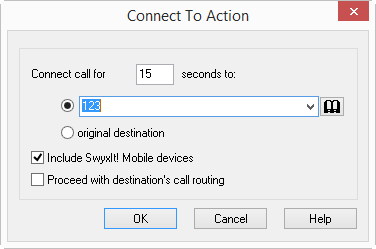
If the destination's call routing is activated, this call will no longer return to you but will be handled according to the destination's rules. Actions relating to the call itself can no longer be executed.