2.7.5 Standard Voice Box
In the system rules, you can configure on the "Standard Voice Box" tab the settings of your Standard Voice Box.
You can define the text for a welcome announcement. Every subscriber who wants to leave a voice message for you will first hear this announcement. You also determine whether callers can leave a message at all and where the voice message is sent.
In addition, the Remote Inquiry options can be set here. With remote inquiry, you can, for example, listen to your voice messages from another connection or change your immediate forwarding.
The recording will be terminated
 when the caller goes on hookafter the maximum recording time has expiredafter a pause in conversation of five secondsafter entry of ‘#’.
After recording the voice message, the caller can check the recording and, if necessary, re-record the message. The menu for this is played after the recording has been completed.
The parameters defined here always apply when the call is forwarded to the Standard Voice Box.
The caller can cancel the announcement or the recording of a message at any time by entering a '0'. In this case, it will then be forwarded centrally.
How to configure your Standard Voice Box
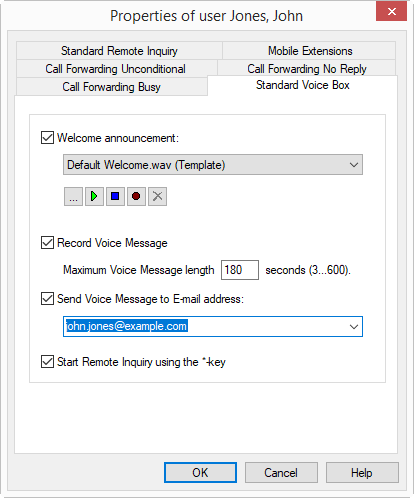
 From the dropdown list select a file.Browse your hard drive by clicking on
  .
.Click on
 , to listen to the selected file. Click on
  to stop playing the file.To record a new announcement, click on
  : You will now be prompted to enter a file name. The "Start Recording" window will appear. Click on "Start" to begin recording the announcement. Stop recording by clicking on .To delete the selected file, click on
  .
.The WAV files, which the administrator has made available to all users, have the extension "(Template)" in the file name. These templates cannot be deleted.
to play an announcement to the callers, and record voice messages. Here you can also limit the length of the recording so that the files, in which the messages are stored, do not become too large.out to play only an announcement to the callers, but not record voice messages.It is recommended to limit the message length, since a voice message requires a storage space of 2 to 16 KB per recording second, depending on the compression (e.g. an announcement of 14 seconds corresponds to 28 to 224 KB, an announcement of 1:21 minutes to 1.2 MB).
Editing a Recording
After recording a voice message, you have the following options:
DTMF entry | |
|---|---|
 | Cancel the voice message and forward to the operator desk |
 | Save and send the recorded message |
 | Listen to the recorded message |
 | Re-record a voice message. The previous message will be deleted. |
 | Start the Remote Inquiry if this has been configured. |
The selection of the menu items takes place via the DTMF tones the caller enters with his telephone.