1.3.5 Complex passwords
Your Swyx administrator may oblige you to use a complex password.
In this case, you must select a complex (strong) password each time your change your password:
Complex passwords for SwyxServer must at least meet the following requirements:
 The passwords consists at least of eight characters.The password consists of any characters of at least the four following categories:
- upper-case letters such as: [A-Z]
- lower-case letters such as: [a-z]
- Numbers [0-9]
- special characters, such as: periods, commas, brackets, blanks, hash tags (#), question marks (?), percent signs (%), ampersands (&).
Alphabetic characters (such as: ß, ü, ä, è, ô) and non-Latin characters (such as: φ, π, β) are no special characters and are regarded as letters.
In order to ensure that the entered password is complex enough, a status bar appears, indicating whether the entered password fulfils the safety requirements.
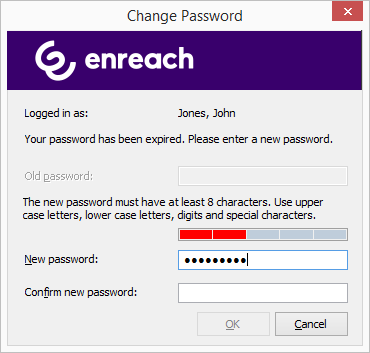
The bar consists of five sections. Each section verifies, if the following password requirements have been met:
At least eight charactersAt least one upper-case letterAt least one lower-case letterAt least one digitAt least one special characterThe bar gets longer, the more password requirements have been met.
The color of the bar changes accordingly. It also indicates, if the password is being accepted by the system.
Password status bar | Password requirements | Accepted |
|---|---|---|
 | 3 password requirements fulfilled | Password not accepted |
 | 4 password requirements fulfilled | Password accepted |
 | 5 password requirements fulfilled | Password accepted |
Enter your new password in the field "New Password". If the minimum requirements are met, you can repeat your entry in the field "Retype Password".
It is impossible to use the previous password again.
You can change your complex password anytime you are logged on to the system. See 1.3.4 Changing your password.