26.1.1 Authentication Service
As of v12.20 SwyxIt! Classic uses the authentication service for connections via SwyxRemoteConnector analogue to Swyx Mobile and Swyx Desktop for macOS.
This services establishes connections via RemoteConnector in a simple yet secure way. Within the client settings, users simply enter the public end point (as FQDN or IP Address) of the company network, to which the authentication service is connected.
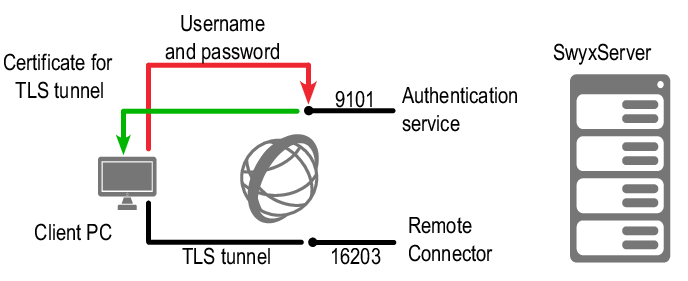
Fig. 26-1: Establishing connections via authentication service
When establishing a connection, the client sends a request to the public endpoint and authenticates itself via HTTPS using the Swyx username and password. The required configuration data for the TLS tunnel (e. g. the client certificate and server address of the RemoteConnector) is transferred to the client computer (and/or smartphone), saved for further connections and subsequently updated as required.