24.8 Fax forwarding as Faxmail or printed document
SwyxFax supports the delivery of fax documents via e-mail. SwyxFax uses the same mail server that SwyxServer uses to send voice messages. You only have to enter the email addresses for forwarding in the user administration.
When saving and processing personal data, observe the respective applicable legal data protection regulations.
Fax forwarding refers to all fax documents that a user receives, regardless of whether this user has different fax numbers.
Format of the Faxmail
The Faxmail contains not only the sent document as an attachment, but also information about the document in the subject line and in the text of the email.
 Subject line
Fax from Station <Sender's number> (<Sender's name>, if this can be resolved)
Email textThe email text contains detailed information on the fax procedure:
Sender information
Number, name, (if this can be resolved) and the transmitted Faxstation ID.
Recipient information, e.g. the destination fax number
Information about the transmission process
Date (dd.mm.yyyy hh:mm), number of pages, duration of transmission process (mm:ss), the resolution (in dpi), the speed (baud rate, internal fax), the status (e.g. receive errors, successful transmission)
Name of the attached fileThe attached file has a name which is composed from several parameters and is thus unique, so that the document can be stored directly under this unique name.
faxdoc-
<Date in format ddmmyy>-
<Time in format hhmm>-
<Sender's number>-
<Sender's name>, if this can be resolved.
<File format PDF or TIFF>
This is how you configure forwarding as Faxmail
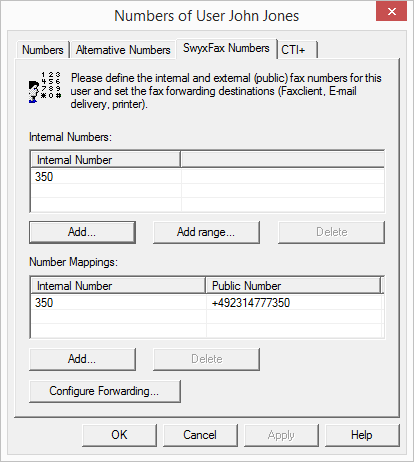
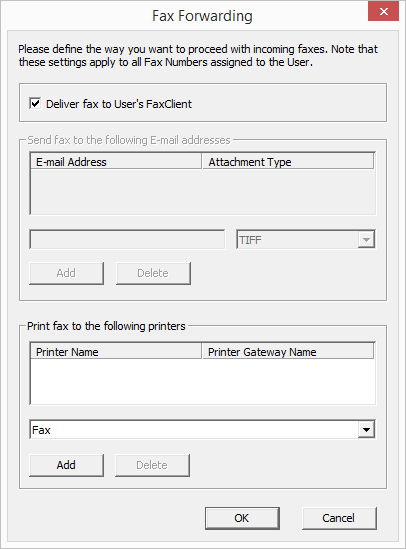
 SwyxFax ClientEmail with fax attachmentPrinting
If you want to have your fax sent by email, you have to use the internet notation for email addresses, i.e. the address must contain the "@" symbol.
If you define forwarding only by email for a user, the fax will be deleted from the SwyxFax Server management after it is transferred to the email server.
Fax documents attached to an email can be TIFF or PDF files. These files are automatically opened by the programs (Windows Photo and Faxviewer or Microsoft Office Document Imaging) which are included in the Windows 2000 and XP operating systems. To open PDF documents you will need Adobe Acrobat Reader. You can find it on your Swyx DVD.
The fax documents are saved as DCX files within SwyxFax. SwyxFax Client uses the SwyxFax Client viewer for displaying these documents.