7.5.9 The "Files" Tab
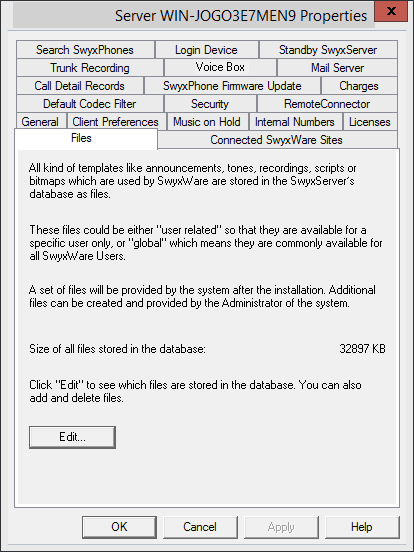
During installation the necessary files are stored in the database. These files include e.g. all ring tones, music on hold, announcements and scripts as well as an individually adaptable template for welcome E-mails, but no fax files.
Here you can see how much storage space these files take up.
You can edit, delete or add files here, e. g. the template for welcome E-mails. Open the list of files with "Edit..."
When saving and processing personal data, observe the respective applicable legal data protection regulations.
Personal data cannot be deleted automatically from the data base. In order to meet the valid data protection regulations, it may be necessary to delete the corresponding entries manually.
How to edit the template for welcome E-mails
Configuration | Available values | Explanation |
|---|---|---|
username | as preconfigured in the system | User name as preconfigured in the system |
password | as preconfigured in the system | The password of the user, as preconfigured in the system |
internalurl | as preconfigured in the system | SwyxServer-Address within the company network |
externalurl | The public endpoint via the authentication service is accessible outside the company network. | |
connectionmode (This value is not interpreted by SwyxIt! Classic) | Preset to "auto" | Connection mode preset: available network is used automatically |
"Standard" | Internet | |
remoteconnectormode | Preset to "auto" | RemoteConnector use preset: is used automatically |
"always" | RemoteConnector is used always | |
connectiontype (This value is not interpreted by SwyxIt! Classic) | preset: "business" | Connection type for data transfer preset: via VoIP |
"private" | via cellular network | |
"request" | You are asked before each telephone call which connection type is to be used | |
oem (This value is not interpreted by SwyxIt! Classic) | "swyx" | These values are set automatically by the installation and must not be changed. |
"tcom" |
You must replace special characters with the corresponding hexadecimal code, e. g. comma='%2C', space='%20', colon='%3A' etc.
The server type and OEM variant configurations are determined automatically by the installation.
You may not change the file name of the template because otherwise the file will not be recognized by the system.
When adding the file, you must select the area "Global" and the category "Templates".
See also How to send a Welcome email.
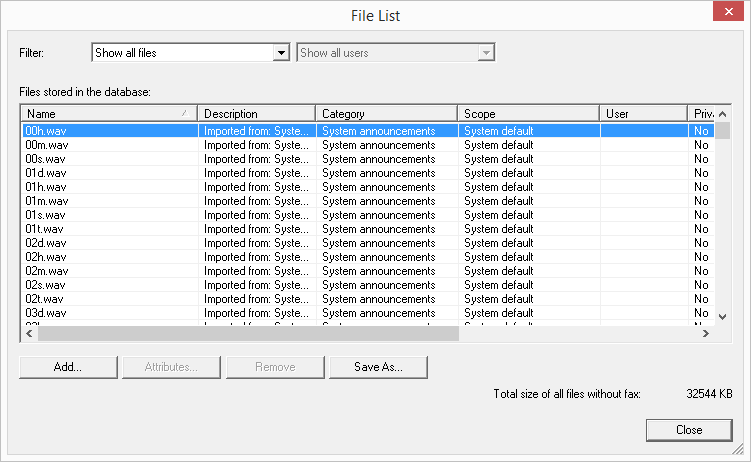
You can choose which files are displayed for you:
 Show all filesShow user files
User files are assigned to an individual user. Only the user himself, an administrator or SwyxServer, if e.g. it processes Call Routing Manager scripts, have access to these files. All files created using the SwyxIt! Classic or Swyx Administration—such as scripts and announcements—are saved as private files. An exception is the file 'Name.wav', which contains the name of the user.
Show user-specific standard filesDuring installation these files are stored for a particular user (e. g. Operator) as standard files in the database. This user can then use these files unchanged. If the files—such as a voice message—are modified further, they are saved as user-specific files and will not be altered by a subsequent Swyx update.
Show global filesThese files (e.g. skins or Call Routing Manager rules) can be used by any user. If they are changed by the user, the changed file is saved as a user-specific file.
These global files allow the administrator, for example, to create templates for all Swyx users, who can then use them with their personal information. For example, a company-wide standardized skin can be stored here, which the users can further develop as they wish; or a call routing script, which the users can then personalize with their own announcement and their number.
Global files with the same name as a system file are given preference; for example, a new global announcement with the name ’Standard_announcement.wav’ replaces the supplied system file of the same name.
Global files remain unchanged during a Swyx update.
Show system standard filesThese files are stored in the database during the Swyx installation and may be updated during an upgrade.
If a file is private, it can only be used by the SwyxServer. Otherwise it is available to all users.
In Swyx versions prior to 6.10, these files were stored in the Share\Data directory.