11.2.2.2 The "Alternative Numbers" Tab
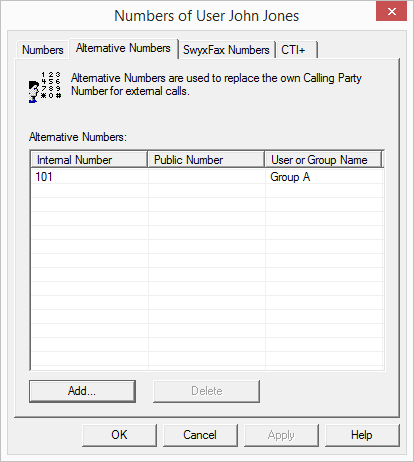
Here, you can specify alternative phone numbers that the Swyx user will display to the caller during outgoing calls.
Which alternative number the user finally signals is defined on a line in the SwyxIt! Classic/SwyxPhone. Alternative numbers are marked there by the addition Alternative number. See 11.2.6.6 The"Line keys" Tab.
Example:
The administrator can allow every Swyx user to signal the operator's number (+44204666100) externally, by adding this number as an alternative number to the group "Everyone". This allows every user to configure this number on the line button as outgoing number.
To remove the assignment of the alternative number, highlight it and click on "Remove".
If the deleted number is specified within the user configuration as the number/URI for outgoing calls, then outgoing calls that should go via this number are discarded. So use another number/URI for incoming and outgoing calls.
To add an alternative phone number that the Swyx user should display when making outgoing calls, click "Add."
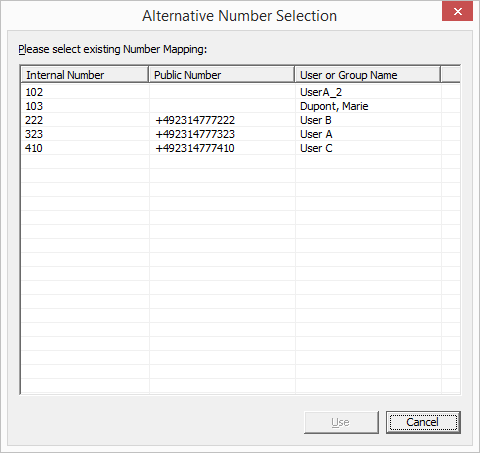
You can choose from all phone numbers that have been assigned within Swyx and are not assigned to this user. Highlight the alternative number you want, and click "Use". Close the tab with "OK" to save the changes you have made.
Next, configure the phone number/URI for outgoing calls for the Swyx user on a specific line button. See 11.2.6.6 The"Line keys" Tab.