11.2.6.3 The "Conversation Recording" Tab
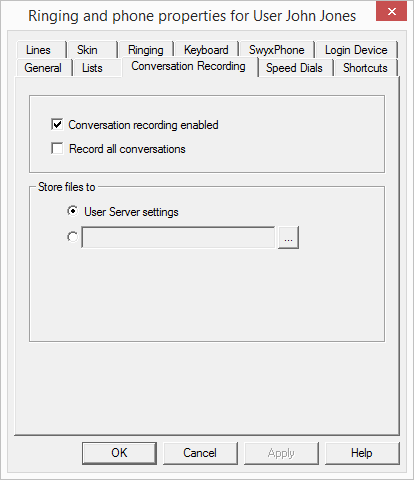
Here you can define
 whether the user is allowed to record conversationswhether all conversations of this user are to be recorded.
Store files to
Here you can set the directory for saving recorded conversations. If you select "User server settings", the files will be saved to the directory set in the default server settings. (7.5.2 The "Client Preferences" Tab). Alternatively you can also enter a different directory here.
If you select a different directory, please note that the user needs write permission for that directory. In order to listen to the list of recorded conversations the user also needs read access to this directory.
The file name for the recorded conversations is composed as follows:
<Direction of the call>#A differentiation is made between outgoing calls (OUT) and incoming calls (IN).
<Number of the user>#This is the extension called (IN) or the extension from which the call was started (OUT).
<Name of the conversation partner>#The name can only be given if the number has been assigned a name.
<Number of the conversation partner>#Will be displayed if one exists. Please note that the public line access will also be saved.
<Date of the call>#Date in the format <yyyymmdd>
<Time of the call>Start time of the call using the format hhmmss
Example:
The name
Out#123#Schulz, Eva#0012345678#20050217#155844.wav
means that an outgoing call from the number "123" to Eva Schulz with the number "0012345678" was recorded on February 17, 2005 at 15:58:44.
The recorded conversations can be viewed and played by the user in the Recording List. This list only contains the recorded conversations associated with the personal extensions of the corresponding user. If a group call is picked up, the conversation is associated with the same personal number as the one used for outgoing calls from this line.
If a user has the permission to record conversations him/herself, he or she will be able to delete recordings in this list – otherwise only the system administrator can delete recorded conversations.
If the user initiated the recording of the conversation, only the phone call to one conversation partner is recorded. An inquiry call made during a conversation can be recorded by recording it to a separate file.
If the recording of a conversation was specified by the Administrator, several simultaneous conversations will be saved to the same file.