3.4 Speed dials
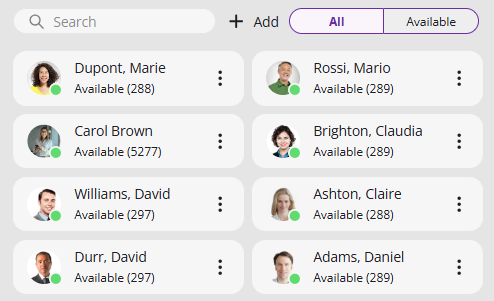
The numbers of frequently called conversation partners can be assigned to Speed Dials. The Speed Dials allow you to dial your contacts quickly with a single click. The status of the subscriber is also signaled on the Speed Dial.
When saving and processing personal data, observe the respective applicable legal data protection regulations. If you have any questions especially regarding data protection in Swyx, please contact your administrator.
Personal data cannot be deleted automatically. In order to meet the valid data protection regulations, it may be necessary to delete the entries manually.
Options on the Speed Dial
Option | Explanation |
|---|---|
Call the contact | |
Open chat | |
Edit the Speed Dial |
By clicking on the Available tab, you can filter speed dial for logged on and available contacts.
To add a Speed dial
 The Speed dials are displayed.A pop-up window appears where you can configure the Speed dial. See 8.9.1 Configuring Speed dials.
To edit a Speed dial
The Speed dials are displayed.A pop-up window appears where you can edit the speed dial, see 8.9.1 Configuring Speed dials.For further information concerning Speed dials see 8.9 Speed Dial and Status Signaling.
To start a call via the Speed Dial
The Speed dials are displayed.The call is initiated.or
The Speed dials are displayed.The call is initiated.To start a chat via the Speed dial
The Speed dials are displayed.Swyx Messenger opens and you can use the instant messaging function.For more information, see 9 Swyx Messenger.
To delete a Speed Dial
The Speed dials are displayed.A pop-up window appears where you can edit the speed dial, see 8.9.1 Configuring Speed dials.The Speed Dial is deleted.