4.1 Telephoning
You can start calls directly from the Microsoft Teams interface. You have several options for starting a call:
 From your contact listFrom the recents listFrom a contact’s profileFrom the dialpad
Calls that are started via the Enreach Contact App for Microsoft Teams are carried out on the device that you set under Device for outgoing calls.
If you want to use the Enreach Contact softphone (e.g. with a headset) in combination with the Enreach Contact App for Microsoft Teams, you will still need to install the Enreach Contact Desktop Client. This is necessary as Enreach is not allowed to use the WebRTC capabilities of Microsoft Teams.
Enreach is not allowed to send push notifications to Microsoft Teams, for example, on an incoming call to your softphone.
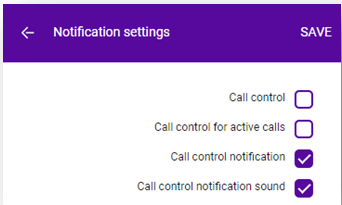
To ensure that you don't miss an incoming call to your softphone with the Enreach Contact App for Microsoft Teams, please use the following notification settings in the Enreach Contact Desktop Client (if you are using a fixed or mobile device, you will of course be notified by the ringing event of these devices instead).
To start a call from a contact’s profile
 Your contact list appears.The call is initiated and you can make the call on your selected device, see Device for outgoing calls.
To start a call from the dialpad
1 Click on Contacts or  Calls.
Calls.The dialpad appears.The call is initiated.