12.2.1.4 Create DECT base station(s)
At least one DECT system must already have been created.
You must create a base station object for each DECT base station that you want to use.
Have the MAC address ready. The MAC address of the DECT base station can be found on the packaging or on the last line of the white label on the underside of the housing:
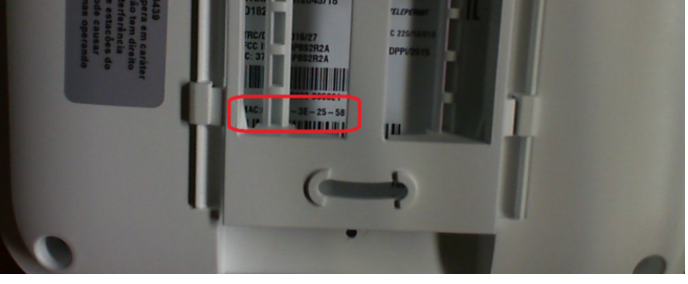
MAC address on a DECT 800 base station
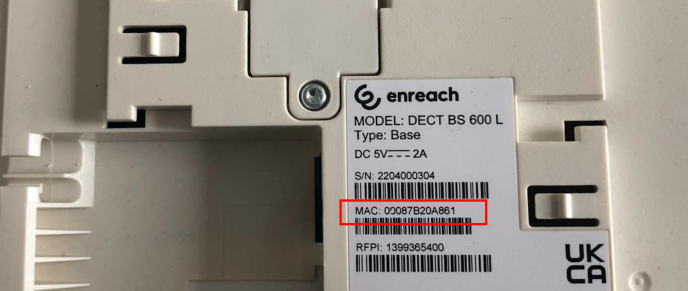
MAC address on a DECT 600 L base station
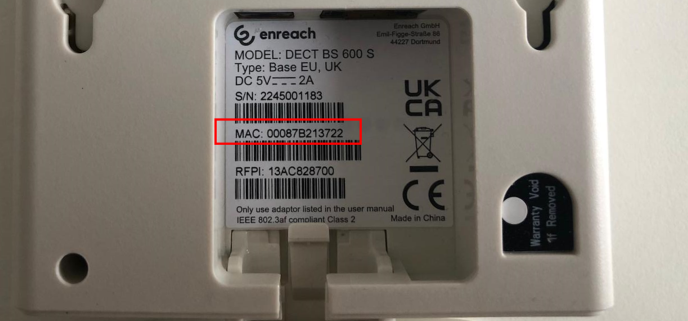
MAC address on a DECT 600 S base station
To create base stations manually
In the name of the base station, you can refer to the location of the end device to facilitate maintenance work.
For DECT 600, you can also enter the MAC address without the separator as it appears on the packaging.
e. g. a1c2e3f41112.
e. g. a1c2e3f41112.
Label | Explanation |
|---|---|
Name | Enter a unique name for the new DECT base station. |
MAC-adress | Enter the MAC address of the base station. e.g. a1:c2:e3:f4:11:12 |
DECT system | Select an existing DECT system to which the base station is to be assigned. |
 The DECT base station is created and appears in the list DECT base stations.
To import a list of base stations
Enter the MAC addresses, the names of the base stations and optionally the names of the DECT systems to be assigned, separated by a semicolon. The entries must be one below the other.
e.g.
a1:c2:e3:f4:11:15;BaseStation01;DECT_System01
a1:c2:e3:f5:12:12;BaseStation02
a1:c2:e3:f6:15:14;BaseStation03;DECT_System01
e.g.
a1:c2:e3:f4:11:15;BaseStation01;DECT_System01
a1:c2:e3:f5:12:12;BaseStation02
a1:c2:e3:f6:15:14;BaseStation03;DECT_System01
- The MAC addresses can be found on the underside of the respective housing, see 12.2.1.4 Create DECT base station(s)
- You can define the unique names of the base stations individually.
- The names of the DECT systems can be found in the list under Devices | DECT | DECT systems.
- You can define the unique names of the base stations individually.
- The names of the DECT systems can be found in the list under Devices | DECT | DECT systems.
If you have not entered the DECT systems in the .CSV file, you can also carry out the corresponding assignment manually after uploading the file, see step 6 below.
The .CSV file must not contain more than 100 entries.
The Import DECT base stations configuration wizard appears.Click the cross icon to remove the file from the selection.
The base stations have been registered in the system according to the import result and appear in the list DECT base stations.