9.12.1 Configuration in the Graphical Script Editor
You can find out how to create a GSE script in the documentation for the Graphical Script Editor help.enreach.com/cpe/14.25/GSE/Swyx/en-US/
Action block "Connect To"
The settings for the "Deliver to mobile" function must be defined in the "Connect To" action block. See help.enreach.com/cpe/14.25/GSE/Swyx/en-US/#context/help/_connectTo_$
The following options are relevant for the "Deliver to mobile" function:
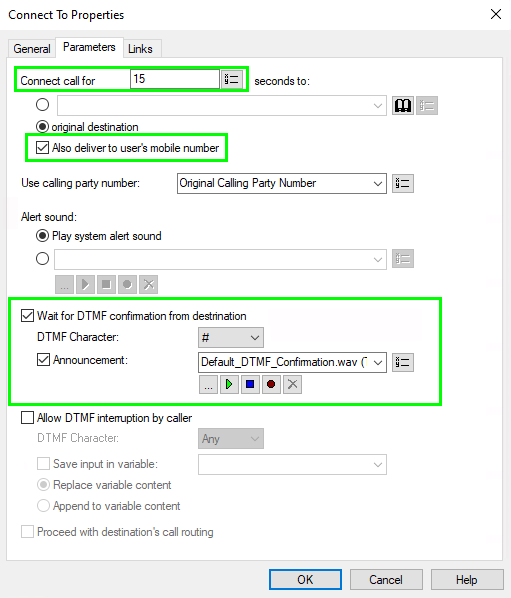
Connect call for N seconds to:
This is the duration of the call signaling or how long attempts are made to reach the destination number (timeout). The delivery attempt is then deemed to have failed. You must therefore allow sufficient time, depending on the other parameters of your script.
The destination of the call can be an internal number of a user or a group. If the "(to) original destination" option is activated, the target is created within the script context (i.e. the parameters in other blocks).
For group call scenarios, please note that the call duration can also be set for the entire group (Ringing time in seconds option), see 10.1 Creating Groups.
In this case, the total duration is the sum of the call duration in the script (in the "Connect To" block) and the call duration for the group.
In this case, the total duration is the sum of the call duration in the script (in the "Connect To" block) and the call duration for the group.
Also deliver to user’s mobile number
This is the main setting. To enable the "Deliver to mobile" function, you must activate this option.
The entry that you have configured for the respective user or group member in the Swyx Control Center is used as the mobile phone number. (see To enter the user's mobile phone number).
For group call scenarios, also note the distribution type of the respective group ("Parallel", "Rotary" etc.), see 10.1 Creating Groups.
Parallel distributions can cause a large number of simultaneous external calls. This can exceed the available trunk capacities.
Parallel distributions can cause a large number of simultaneous external calls. This can exceed the available trunk capacities.
The default call authorization for a group is Internal destinations.
If calls are to be delivered to the mobile number, make sure that the call authorization for the corresponding group is set to at least National destinations, see 10.2 Editing the general settings for Groups.
If calls are to be delivered to the mobile number, make sure that the call authorization for the corresponding group is set to at least National destinations, see 10.2 Editing the general settings for Groups.
In the case of a rotary or sequential group call, a group member who was busy during the last call is called again during the next round. However, if a user has explicitly rejected the call, it will be ignored on further attempts.
If the user has set their status to "Do not disturb", no attempt is made to call them.
The Call Detail Record registers the information about which group member has finally picked up the call and, if applicable, confirmed the acceptence.
If the availability of a group is used as a script parameter, please note that the overall availability of the group may increase due to the availability of the individual members via mobile devices.
Wait for DTMF confirmation from destination
Activate this option if the called party should confirm the call acceptance with a preconfigured key.
If DTMF confirmation is not activated, the user accepts the call directly by pressing the answer button.
If a call is not answered but forwarded to a VoiceBox, for example, this call is considered to have been put through. If calls actually have to be answered by people, it is recommended to activate DTMF confirmation.
After pressing the answer button - or if configured - after the announcement has been played in full the user has 10 seconds to confirm the call with a DTMF character.
DTMF Character:
Select a DTMF symbol to be used to confirm the call acceptance on the cell phone.
Announcement:
Activate this option if you want an announcement to be played before the DTMF confirmation. You can use the standard greeting "Standard_DTMF_Bestätigung.wav" or create your own greeting.
If the group call is distributed in a parallel group, only one call can reach the DTMF confirmation status. This means that only the group member who picks up the call first has the option of pressing the DTMF character and accepting the call. If there is no confirmation, delivery of the call has failed.
You can specify that no DTMF confirmation is requested on internal devices. To do this, activate the TrunkOnlyDTMFconfirmation option ( IpPbxSrvtab). See 4.22 Defining expert settings.