2.4.2 Type of Call
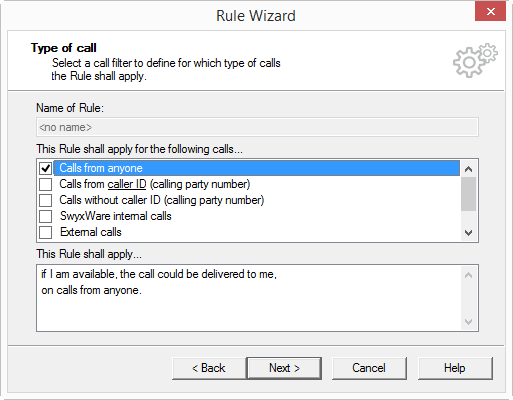
In the window "Rule Wizard-Type of Call" () you can define additional conditions.
All possible types of calls are listed under "This rule shall apply for the following calls…". A rule can be applied to different types of calls. Conditions which have already been selected are shown with a check mark.
Condition with Parameters
If a condition requires additional information (for example, the telephone number), then the necessary information is underlined in the condition. You will see the exact value under "This rule will be used…". It is shown underlined.
When a condition is newly selected, a window, which requests the value, will automatically appear. To change an entry in a condition which has already been selected, click on the underlined value in the rule description.
You can select from the following supported conditions in regards to the type of call:
 Calls from any numberCalls from caller ID
You can take the caller ID from the address book or enter it directly. You can enter several different numbers by separating them with a semicolon.
Caller without Caller ID (you see ‘XXX’ in the display) Swyx internal calls onlyExternal calls onlyCalls to caller IDYou can take the number from the address book or enter it directly.
Calls to any of my numbers (if you have several numbers).Wildcards can also be used here, for example, in order to be able to specifically identify international calls by entering "000*" (Public line access+ international country code). In doing so, ‘*’ can stand for several numbers and ‘?’ for exactly one number.
You can combine the conditions concerning the caller’s number with the conditions concerning the number dialed.
This is how you define the conditions of the call types for a rule