2.3.2.6 The Shortcut Menu of a Block
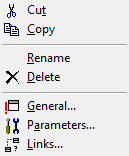
If you click with the right mouse button on a block, you will receive the shortcut menu of the block that is highlighted. In this menu you can
 edit the currently active block andchange its properties.
This is how you open the shortcut menu of a block
Menu Command | Explanation |
|---|---|
Cut | Copies the highlighted blocks to the Clipboard while deleting them from the script window. |
Copy | Copies the highlighted block to the Clipboard. |
Rename | Renames the highlighted block. |
Delete | Deletes the highlighted block. |
General... | Displays the "General" tab in the "Properties" window of the highlighted block. |
Parameter... | Displays the "Parameters" tab in the "Properties" window of the highlighted block. |
Connections... | Displays the "Links" tab in the "Properties" window of the highlighted block. |