2.3.2.8 The Shortcut Menu of the Script Window
If you click with the right mouse button on the background of the Script window, the corresponding shortcut menu will appear. In this menu you can
 change the properties of the currently active script,insert blocks andunder "Settings", you can change the view of the script.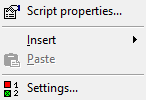
Menu Command | Explanation |
|---|---|
Script Properties... | Opens the window containing the general script properties Here you can change the script name, author, description and the block appearance. |
Insert block | Enables access to all blocks. |
Insert | Pastes a block from the clipboard. |
Settings… | The "Settings" window will be opened. Here you can define the view of the interface. |