2.3.8 Toolbars
Below the menu bar you will see the different toolbars.
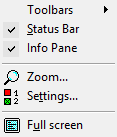
You can indicate which toolbars should appear here in the "View" menu. The following toolbars are available for selection:
 File
FileHere you will find all symbols for file and script editing.
 Common Blocks
Here you will find a list of all available, common blocks. You can select these in the toolbar and position them on the script window.
Mail Access BlocksHere you will find all of the blocks you need for reading and managing e-mails in a mailbox.
Queue BlocksHere you will find all blocks that are necessary for managing calls in a queue.
A check mark indicates which toolbars are currently activated.
You can also drag the toolbars individually per Drag & Drop into the script window or place them vertically next to the Info pane.