2.6.7.3 Get Queue Attributes
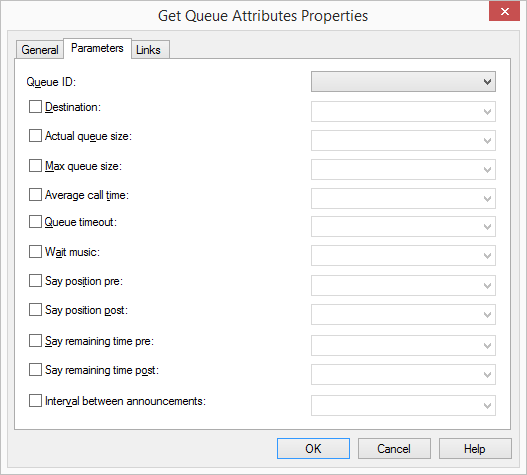
The detailed information corresponding to the queue can be saved here in different variables. The following detailed information is available:
 Queue ID
Every queue has an unique ID. This is a system-wide identification number of a queue.
Called partyGives the destination of the call, which is in the queue. This can be a Swyx user or a group.
Current Length of QueueGives the current number of calls, which are in the queue.
Maximum length of the queueGives the maximum number of calls, which can be added to the queue.
Average Call DurationGives the average duration of calls, which are in the queue. This value is used for determining the estimated wait time. It can only be hypothetically set.
The value of the field "Average call duration" should be entered in seconds. This value will be converted before the voice output in minutes, rounded and shown.
Queue TimeoutThis value indicates how long a call (in seconds) can stay in the queue.
Music on HoldThe music on hold is a file in WAV format, which is played in a loop for all callers in the queue. This music on hold can be interrupted by individual announcements, such as the announcement concerning the position of the call in the queue and / or the announcement concerning the estimated wait.
Announcement before and after the position informationThese parameters define the announcement files, which are to be played before and after the position announcement. The position information itself can played via an announcement file using the "Play String" block.
Announcements before and after the time to wait informationGives the announcement files, which should be played before and after the wait time announcement. The wait time information itself can played via an announcement file using the "Play String" block.
TimeBetweenWavGives the time interval in seconds to be kept between the individual announcements.
This action will be terminated, if
the selected parameters of the queue, from which the variables were successfully read, orerrors occurred when setting the parameters (e.g. no queue with the corresponding ID exists), orthe call has been terminated.Under "Properties", all three tabs "General", "Parameters" and "Connections" tabs are available for this block.
This is how you define the parameters for "Call Queue Attributes"
Links
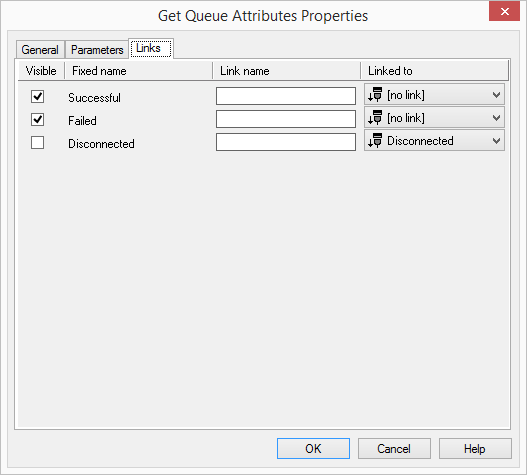
On this tab you will find all outputs associated with this block. The outputs are described as follows:
Output | Explanation |
|---|---|
Successful | This exit is chosen, if the selected parameter of the queue has been saved in the assigned variable. |
Error | This exit is chosen, if the selected parameter of the queue could not be saved in the assigned variables (e.g. because no queue with the corresponding ID exists.). |
Disconnected | The current call was disconnected. |
In the first column "Visible", you can define whether each output should be shown in the script window.
The "Visible" column is only used to define the visibility of the links in the script window. This setting helps to maintain the clarity of the script. You cannot remove outputs, i.e. the connections must be kept, otherwise an error will occur in the script.
The second column "Default" contains the default name of the output. This provides information about events during the execution of a block so that additional appropriate connections can be created. This fixed name cannot be changed. You can assign your own identifying names to the various contact surfaces in the column "Link name". This name will later appear in the block in the grid interface.
In the last column "Linked to" you see which block input this output is connected to. Here you have the option of selecting a link from a select list, which contains all available blocks.