2.8.2 The Settings for the Script Window
Here you can change the view of the script window, such as the appearance of the blocks and the links, and even the appearance of the grid.
This is how you change the view ofuse of the Graphical Script Editor.
1 Go to the toolbar and click on  .
.
.General
On the "General" tab, you define
 whether you must confirm a deletion procedure,whether the block type should be displayed,which of the outputs of a block should be displayed. You can choose between
"All outputs", i.e. a display of all possible outputs including "Terminated", or
"All except system", i.e. no display of the output "Terminated".
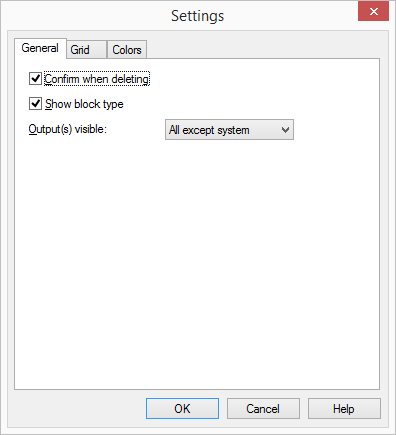
The settings will be applied immediately.
Grid
On this tab you can define the properties of the grid interface in the script window:
Appearance of the gridLines or
Dotted.
Size of the individual grid fields (in pixels)Width and
Height.
Other options, such asAutomatic alignment of the block in the grid (even if no grid is displayed),
Display of the grid (lines or dotted)

Colors
On this tab you can define the colors of the grid interface in the script window:
Background colorColor of the Links (Arrows) according to stateTo select other colors, click on the corresponding color field and select the color. You can use "Other colors..." to receive your PC’s color scale or you can add other colors.
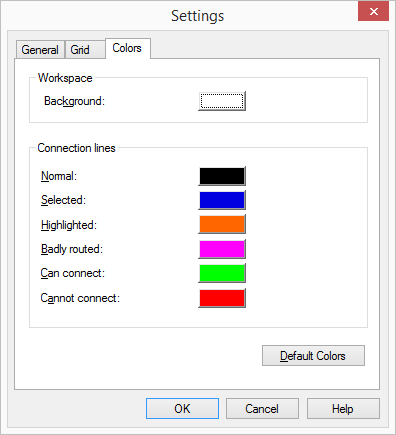
The "Default colors" button can be used to reproduce the default setting of the colors.
A connection line can have the following conditions (colors):
Color | Status of the Connection |
|---|---|
Black | Normal |
Blue | Highlighted (All of the connections associated with a block are highlighted simultaneously.) |
Orange | Highlighted (Only this connection is highlighted.) |
Magenta | The connection is not visible due to lack of space on the script window, the logical connection exists. |
Green | Can be connected (This only occurs when dragging a connection.) |
Red | Cannot be connected (This only occurs when dragging a connection.) |
The color settings shown correspond to the default setting.