25.2.1 Configure a CTI pairing to the number of an external phone
The user can enter a phone number in SwyxIt! Classic, with which he/she wants to control an external phone. It is also possible to enter this number in the Swyx Administration, so it is already available in the SwyxIt! Classic CTI dialog, when the user sets up the CTI pairing.
These two entry options are equal, i.e. deleting a number in the SwyxIt! Classic CTI dialog will also delete the number in the Swyx Administration.
These two entry options are equal, i.e. deleting a number in the SwyxIt! Classic CTI dialog will also delete the number in the Swyx Administration.
If a number of an external phone is assigned to the user, which has been previously assigned to another user as a CTI pairing, the first user immediately loses his/her CTI pairing with this phone.
How to create a CTI pairing with the number of an external phone.
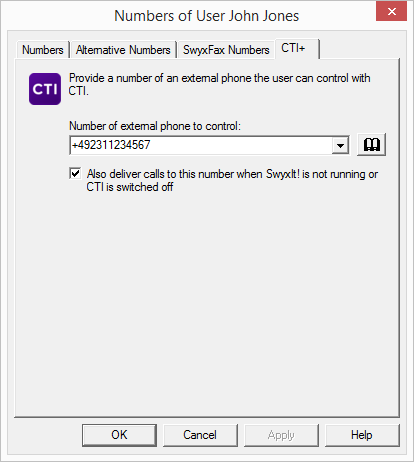
Please note that a CTI pairing with a number, which is assigned to the same user account is not possible.
How to change a CTI pairing with the number of an external phone.
Please note that this change becomes immediately effective in SwyxIt! Classic. The CTI pairing with the new phone will be created immediately and directly without any further confirmation.
How to delete a CTI pairing with the number of an external phone.
Please note that this change becomes immediately effective in SwyxIt! Classic. The CTI pairing will be deleted directly.