7.5.3 The "Music on Hold" Tab
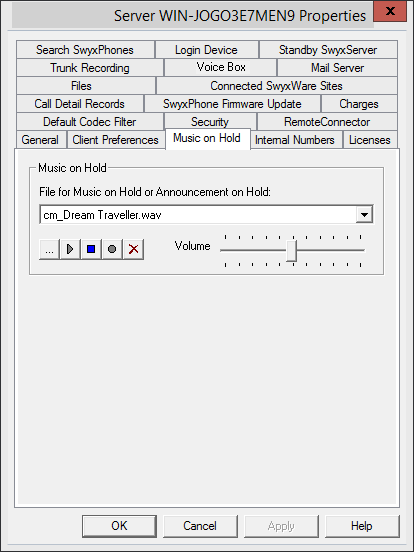
Define the music on hold or the announcement played during on Hold for all users of the SwyxServer. All files that have been stored (globally) in the database as music on hold will appear in the drop-down list. See 7.5.9 The "Files" Tab.
These hold music files all have the "16 kHz 16 Bit PCM mono" audio format. You can switch to another music on hold file by selecting the entry you want. You can search the network for other files in any WAV format using "Browse" ( ). After you have chosen a WAV file, it will be converted into the above format and then saved in the database.
). After you have chosen a WAV file, it will be converted into the above format and then saved in the database.The Window functions used for conversion in this procedure may lead to a deterioration in the quality of the music on hold under some circumstances. In this case you should use a professional conversion program instead of the Windows conversion in order to create WAV files in the above mentioned format.
You can play the displayed file and record a new announcement here. The slider is used to adjust the volume of the music on hold.
The newly selected music on hold file will immediately be used for new calls on hold. Calls which were put on hold while the music on hold file was being changed will continue to hear the old music selection.
How to change the hold music