8.7 Call journal
The call journal offers an overview of your calls. You can open the call journal with the Call journal icon.
When saving and processing personal data, observe the respective applicable legal data protection regulations. If you have any questions especially regarding data protection in Swyx, please contact your administrator.
Personal data cannot be deleted automatically. In order to meet the valid data protection regulations, it may be necessary to delete the entries manually.
The calls are listed on the following tabs:
 All: all calls.Missed: incoming calls that were not picked up.Incoming: all incoming calls.Outgoing: all calls made by you.My Callback Requests: outgoing calls which were not picked up by the called subscriber, and for which you have left a callback request.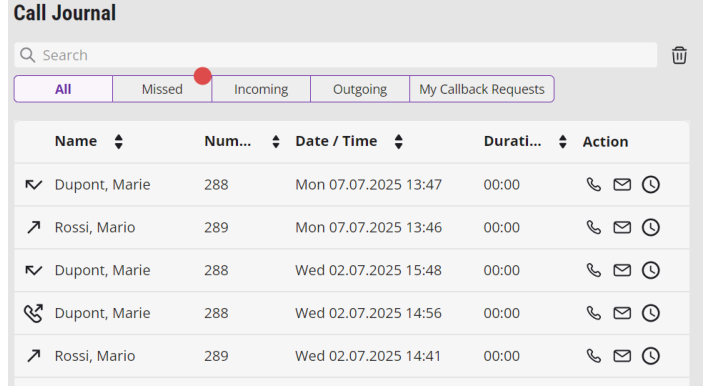
The list directly shows important information for the calls listed in the call journal; and various options are available for handling the calls. For example, you can call a subscriber directly from the list or add the number to your phonebook.
Information on the calls
Further information about the calls is shown in the call journal:
Depending on the size of the window, a category may be hidden. This is indicated by the icon. Change the window size to display it.
Label | Explanation |
|---|---|
Name | Name of the caller |
Phone number | Phone number of the caller |
Date/Time | Time of Call |
Connected to | Here you can see who answered the call for you. |
Call for | Here you can see which number the caller originally dialed, i.e. if the call was forwarded or not. |
Status | For incoming calls only (Incoming, Missed or All). Here you can see, for example, whether a call was picked up or forwarded. See Status of the Calls. |
Duration | The duration of the call is specified here. |
Action | Options to react to the call: You can call the caller back. You can send an e-mail to the caller. You can send call information to DATEV. |
You can change the size of the window simply by dragging it.
Status of the Calls
You can see the status of all incoming calls in the call journal.
Icon | Explanation |
|---|---|
Incoming call (answered) | |
Outgoing call | |
Incoming call (forwarded to Voice Box) | |
Missed call | |
Incoming call (forwarded) | |
The caller has left a callback request. |
Sorting call journal entries
You have the possibility to sort the entries of the call journal in ascending or descending order according to information on the calls.
To sort the entries of the call journal
 The Call journal appears.The calls are listed.The icon changes and the entries are sorted accordingly:
 : the entries are sorted in ascending order.: the entries are sorted in descending order.