5.2.2 Configuring a Line Button
You can define the label for each Line button individually. Since you can also have several numbers, you indicate here which of your numbers or accounts are assigned to lines for incoming and outgoing calls.
An example of an incoming call (you are being called):
You have assigned the number100 to Line1 and the number 101 to Line2. Now, if a subscriber dials the number 101, you will receive the call on Line2.
An example of an outgoing call (you are calling someone):
You have assigned the number 101 to Line2. If you now call a subscriber using Line2, extension101 will be used. The subscriber you have called will see on his display that he is being called by a subscriber with the number 101. If the administrator has configured an alternative number for you, you can select this here. It will be additionally marked as an alternative number.
The assignment of user accounts, e.g. if you have an SIP account with several providers, is similar. Here the call is handled via the provider who is assigned to the line.
To define the properties of a Line button
or
 The Properties of... window appears, which contains several tabs with settings.The Properties of… window will appear.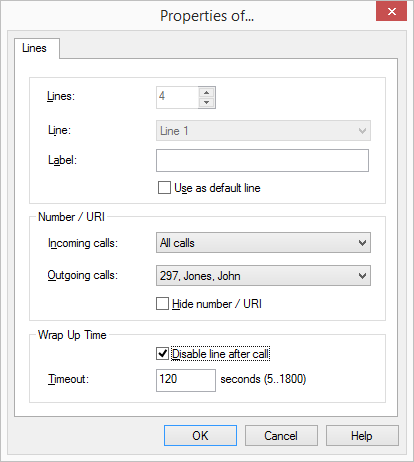
 All ExtensionsNumber or SIP accountGroup Calls OnlyAll Callswill usually be shown to the subscriber called andcan be used for invoicing.
The number of Line buttons is defined in the User settings. There you can configure all Line buttons at once (5.2.2 Configuring a Line Button).