14.1 SwyxIt! controls a SwyxPhone or a certified SIP phone
SwyxIt! is installed on the user PC and controls a SwyxPhone or certified SIP phone with enabled CTI mode, which has to be registered under the same Swyx user. In this case, the phone is independent from the PC and works even when the computer is turned off.
In CTI SwyxIt! the following options for controlling SwyxPhones are available:
For information on the CTI functionality for certified SIP phones see Overview of the SwyxCTI functions for certified SIP phones.
 Dialing can be made directly from Outlook or another application, the Caller/ Redial List or the phone books.Hold, Call Swap, Transfer, Start Conference, Callback or Callback on busyStart or accept another callCollaborationSettingsSpeed dial buttons (names and links)Call and status signalingForwarding, Voice Box and call routing manager are assigned to the user account and are thus the same for SwyxPhone and CTI SwyxIt!.
Not available:
Conversation recordingSpeaker button and microphone of the CTI SwyxIt!To activate SwyxCTI for the control of a SwyxPhone or certified SIP phone
 A pop-up window opens where you can configure the settings.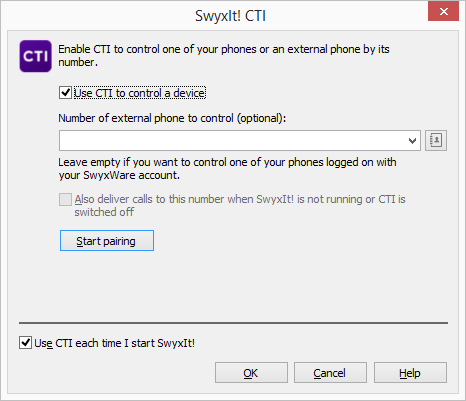
Only devices that have been previously registered to your user account by your administrator are available.
For every Swyx user account, only one SwyxIt! can be operated in CTI mode at the same time.
If you use the CTI SwyxIt! to control your SwyxPhone, and an additional handset is connected to your PC, the handset control will be deactivated. Thus, you can no longer accept Calls or activate a line by lifting the handset. This is only possible with the controlled SwyxPhone.