14.4 SwyxIt! controls an external phone
SwyxIt! is installed on the user’s PC and controls an external phone via the user’s phone number when CTI+ mode is activated. This could be a mobile phone or the phone number of another Swyx user.
When on business trips, you can use your hotel room's phone via SwyxCTI+ for incoming calls. Outgoing Calls can also be made with an external phone. However,in SwyxCTI+ only outgoing calls made directly from SwyxCTI+ are listed.
Calls made directly from an external device are not displayed in the SwyxCTI+. Regular charges apply.
Calls made directly from an external device are not displayed in the SwyxCTI+. Regular charges apply.
You can also enter your mobile number, so that incoming calls are automatically forwarded to your mobile phone.
Another user scenario could be, when a Swyx user is not at his/her workplace, but instead attending a meeting or using a colleague's workplace. Log-on with SwyxIt! , start the CTI mode and activate the pairing to the extension of the meeting room or the colleague.
With SwyxCTI+, you have the following options to control an external phone via its phone number:
 Dialing
Dialing can be made directly from Outlook or another application, the Caller/ Redial List or the phone books.
Call Swap, Transfer, Start ConferenceStart or Pick up a Second CallCollaborationNot available:
Conversation recordingSpeaker button and microphone of the SwyxIt!Accepting incoming calls at SwyxIt! To enable SwyxCTI+ for the control of an external phone
 A pop-up window opens where you can configure the settings.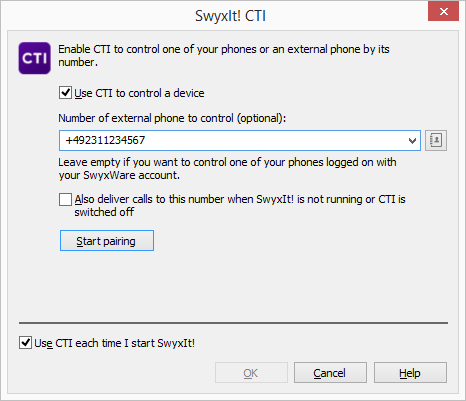
Please note that you need the rights in the Swyx Administration to control an external phone by its number. For more information, please contact your administrator.
Please note that you can continue to place Calls directly from the external phone, independently from SwyxIt!. Regular charges for this phone connection apply.
Please note that you cannot do a CTI pairing with a phone number that is assigned to your user account within the Swyx Administration.
Please refer to CTI+ for further information on using DTMF strings with CTI+.