My Devices
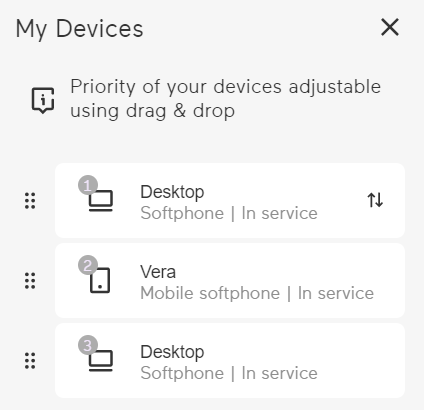
You can select with which (end) device you prefer to use Enreach Contact Desktop. You can specify an order in which the devices are switched through if the preferred device is not available.
To select your device in Enreach Contact Desktop
 The My Devices list opens. The devices in the list are prioritized.Your changes are applied.
If the default device is Out of service, Enreach Contact Desktop will use the next device on the list. For example, if you are using a headset as your default device and it is currently inactive, Enreach Contact Desktop will automatically switch to the next device, such as a desk phone, when you receive a call.

You can also manage your devices from the navigation bar, see 4.5 My Devices, or before a call, see 9 Starting and receiving phone calls.
An arrow to the right of the device name indicates whether the device can receive or initiate calls. Some devices, such as mobile softphones, can only receive calls.
 | The device can receive and initiate calls. |
 | The device can only receive calls. |
 | The device can initiate calls. |