2.2.13 Set the language of the user interface and number of VisualGroups lines in the client
To edit a skin, see chapter "Editing Skin" or "The Use of Skins" in the SwyxIt! documentation.
In the editor mode there are VisualGroups placeholders for the queues view (1, top right) and if available the statistics area (2, down right).
Parameter | Value |
|---|---|
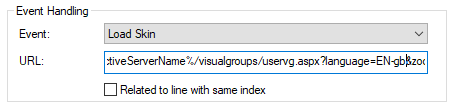
[language=XX-xx] | ‘DE-de‘, ‘EN-gb‘, ‘FR-fr‘, ‘IT-it‘, ‘NL-nl‘. |
For the first change replace
%{HKEY_LOCAL_MACHINE\SOFTWARE\Swyx\ClientSetup\,Culture} with one of the language parameters.
%{HKEY_LOCAL_MACHINE\SOFTWARE\Swyx\ClientSetup\,Culture} with one of the language parameters.
Parameter | Description |
|---|---|
[rows=xx] | For 'xx', enter the number of desired lines in digits. For example, enter '20' to enlarge the display to 20 lines. |
Make sure that you adjust the size of the Web Extension accordingly when you change the number of columns in a SwyxIt! Make sure that you adjust the size of the Web Extension accordingly if you want to integrate the changed number of columns in a SwyxIt! Skin. To adjust the size of the Web Extension, enter a value for the parameter 'zoom=xx'.