2.7.1 Visual Basic Script as Sub-Program for Multiple Use
If you would like to have your own sub-program started several times during call handling, insert it as a Visual Basic Script in the "Parameter" tab on the properties side of the start block. At the point in the script, at which the sub-programs are to be started, enter the block "Set Variable", for example, and start the sub-program you want there.
It is possible to call one of your own functions, which has been defined in the "Start rule" block, in all blocks that permit the entry of a variable or function. The block "Set Variable" is especially suitable for this purpose. The name of your sub-program will then appear in the field "Variable value" preceded by an equal sign. The entry of a variable in the field "Variable name" is only necessary if your are dealing with a function that provides a return value.
This is how you integrate your own script
If the script contains syntax errors, the call will be disconnected, even if the faulty sub-program is not used. The Graphical Script Editor is not able to check your script for errors.
This is how you start your own sub-program
3 Click on  found on the "Parameters" tab.
found on the "Parameters" tab.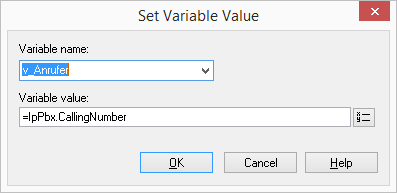
The call for one of your own sub-programs or a system function must always begin with an equal sign (=), otherwise the the Graphical Script Editor interprets the entry as a string and not as a function call.