6.1.2 Standard forwarding and temporary forwarding
If you activate the option Forward all calls unconditionally, you can also define whether you would like to forward certain calls to another subscriber (temporary forwarding) or use your standard forwarding setting:
 Default Call Forwarding
The settings are always in effect when forwarding is enabled. These settings will be followed until you disable the forwarding again. You can apply these settings again the next time you forward your calls.
Permanent forwarding is activated by clicking on the Forwarding button. The settings for this can be defined during configuration under Default Call Forwarding (switched on using forwarding button).
Temporary Call ForwardingThis forwarding is switched on and off separately. This is only in effect until you switch off this temporary call forwarding again. The default forwarding will automatically be activated the next time you activate call forwarding.
If you have defined Call Forwarding Unconditional for your calls, the corresponding icon is activated on the user interface.
If your forwarding is appropriately configured, you can also change the parameters for "Unconditional Call Forwarding" per remote inquiry (7.5.1 Changing Forwarding Unconditional by Remote Inquiry).
Furthermore, you can also activate unconditional call forwarding to another user directly from his terminal device.
To forward all calls (Unconditional Call Forwarding)
or
or
 A pop-up window opens where you can configure the settings.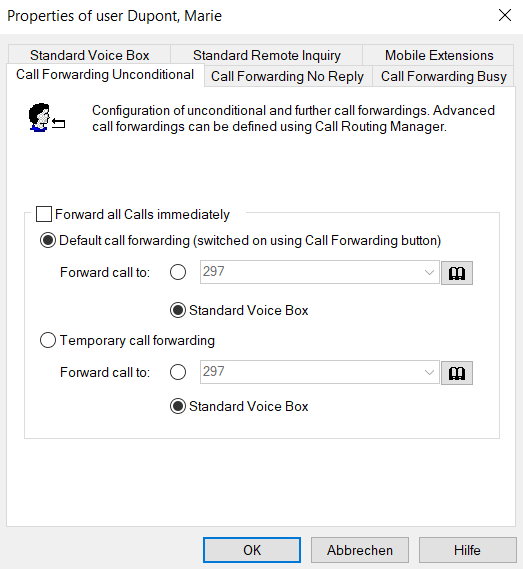
 entered directly you can select it from the Phonebookactivate the standard Voice Box.